
You can log in to Wixie with your Google ID if your organization has set Google ID as the authentication method.
You must be logged in to Google with the same account you will use to log in to Wixie.
Get the assigned URL for your organization from your teacher or Wixie site administrator.
The URL will look something like this:

Press the Enter key on the keyboard.
You will see the Wixie log in page.
Click the Sign in with Google button.

You will see the Google Accounts sign in page.
Enter your Google email address in the Email field and press Next.
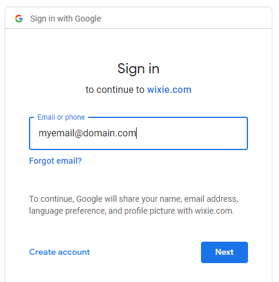
(If you are not already logged in to Google, enter your Google password in the Password field. If you are already logged in to Google, you should only have to enter your Google email and you'll automatically be signed in to Wixie.)
You will see another Google accounts page.
Click the Allow button.
You will be logged in to Wixie.
As long as you are signed in to your Google account, you will no longer have to log in to Wixie. If you enter your Wixie URL, you will be logged in automatically.
Get the assigned URL for your organization from your teacher or Wixie site administrator.
The URL will look something like this:
https://yourschool.wixie.com
Where "yourschool" is the identifier for your organization.
Enter the URL in the browser address field.
Enter the URL in the browser address field.
Press the Enter key on the keyboard.
You will see the Wixie log in page.
Click the Sign in with Google button.
You will see the Google Accounts sign in page.
Enter your Google email address in the Email field and press Next.
(If you are not already logged in to Google, enter your Google password in the Password field. If you are already logged in to Google, you should only have to enter your Google email and you'll automatically be signed in to Wixie.)
You will see another Google accounts page.
Click the Allow button.
You will be logged in to Wixie.
As long as you are signed in to your Google account, you will no longer have to log in to Wixie. If you enter your Wixie URL, you will be logged in automatically.